Your service business website not getting calls comes down to four root causes: the right people are not finding the site at all, the site does not clearly say who you serve and where, visitors do not trust the business enough to call, or the path from landing on the page to dialing your number has too much friction. Most sites with no calls from website traffic have a positioning or friction issue, not a traffic issue. Diagnosing which of the four is active matters because each requires a different fix, and solving the wrong one wastes time and money.
Most plumbers, roofers, HVAC companies, and electricians who reach out to us describe the same situation. The site is live, something is showing up in Google, but the phone is not ringing the way it should. The instinct is to blame traffic. The reality is that a website not getting calls or leads is almost never purely a traffic problem. It is usually one of four specific failures, each with a different fix.
This article walks through all four. If you already have visitors and just want to know why they are not calling, jump to sections two through four. If your site is getting very little traffic at all, start at section one. The right diagnosis is the only path to the right fix.
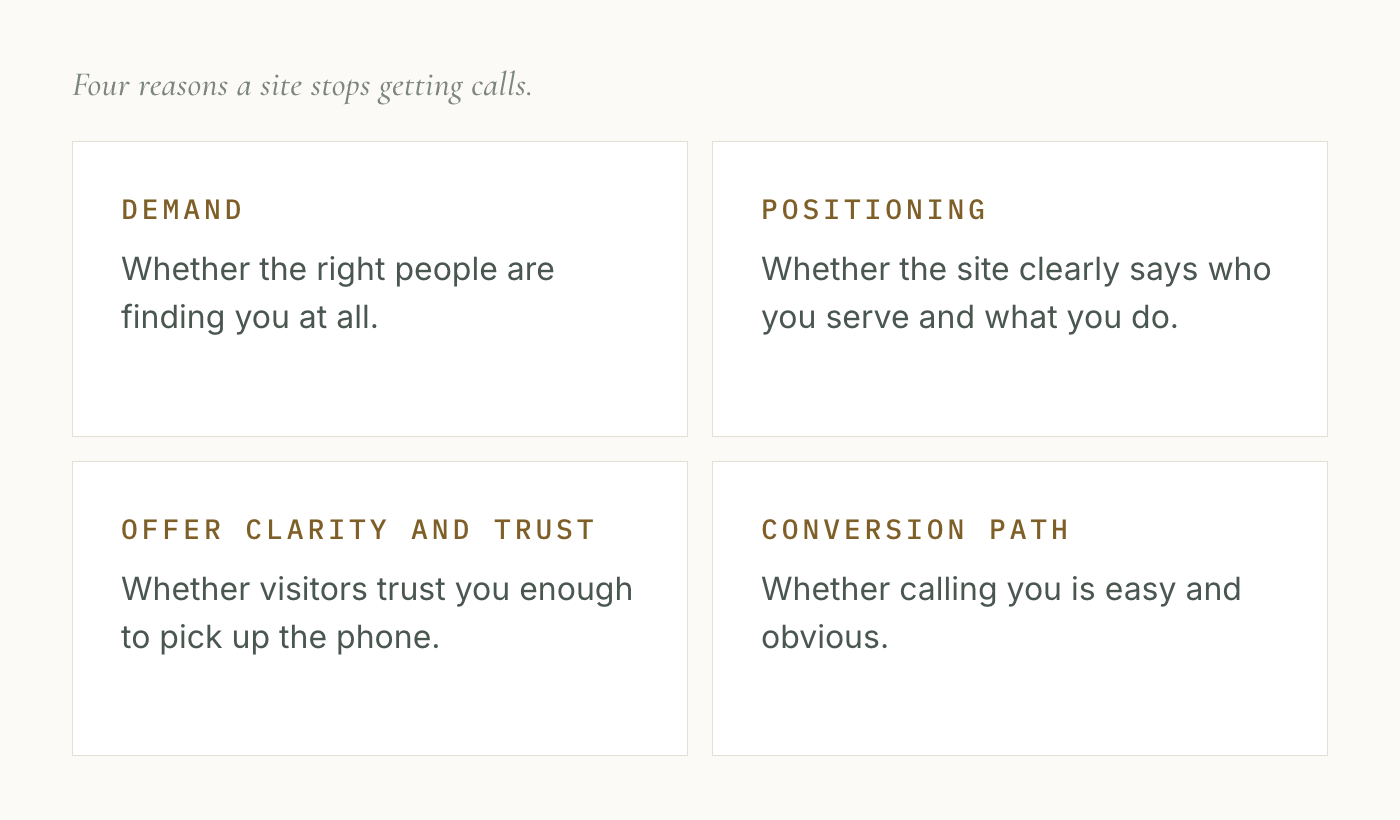
Is your website not getting calls because the right people are not finding it?
The first question to answer is whether people who need your services are actually landing on your site. If they are not, nothing else on the page matters.
A plumber in Phoenix needs to appear when someone in Phoenix searches "emergency plumber" or "pipe burst repair." A roofer in Dallas needs to show up for "roof replacement Dallas" or "storm damage roofer." A local business website not getting leads is often a site that ranks for the business name but not for service searches from strangers who do not already know the company exists.
The distinction matters: there are visits from people who already know your name, and there are visits from people who found you by searching for a service. Only the second type generates new customers. A plumbing site getting fifty visits a month from people searching the business name is not the same as a plumbing website getting fifty visits from people searching "plumber near me Phoenix." The first type does not drive new calls.
How to checkOpen Google Search Console (free, takes a few minutes to connect to your site). Look at the Queries report. Are the search terms bringing visitors to your site the names of services you sell, in the cities you work in? If you are getting fewer than a few dozen visits per month from service-related searches, search visibility is the starting problem.
One thing that sometimes surprises owners: a site can be indexed in Google and still have a demand problem. Appearing on page two or three for a search generates almost no clicks. The site exists in Google's index but is not being seen by the people who need it. "We rank for roofing" is not sufficient. The question is whether the site appears in the first handful of results for searches that generate real traffic.
If this is your category, the article on whether you need a new website or just SEO covers it in more detail. The short version: a demand problem is separate from a conversion problem, and the two require different fixes. If demand is the issue, that is where to start. Fixing the conversion path first will not help if no one is arriving.
Why do I have a website but no one is calling?
If people are finding the site but the phone is still quiet, the most common cause is positioning. Positioning means the site clearly names who you serve, what you do, and where you do it. When a visitor lands and cannot answer those three questions in the first five seconds, they leave. This is the core reason why a small business website not generating leads looks fine on the surface but produces no calls.
A roofing site that leads with "Quality Roofing Services Since 2008" is not positioned. A roofing site that says "Residential and commercial roof replacement in the greater Houston metro, storm damage specialists" is positioned. The second version earns a call before the visitor even scrolls.
The same pattern shows up across trades. A plumber whose homepage headline reads "Your Trusted Local Plumber" has told the visitor almost nothing. A plumber whose headline reads "Emergency and scheduled plumbing in the Raleigh area, same-day service available" has given a leaking-pipe customer every reason to stay and call. That is what "website not getting calls" looks like at the top of the page: complete in appearance, vague in substance.
Visitors do not read websites. They scan. Research on web reading behavior shows that the average visitor decides within a few seconds whether to stay or leave. If the clearest statement on your page is a generic tagline, they leave before they ever reach the phone number.
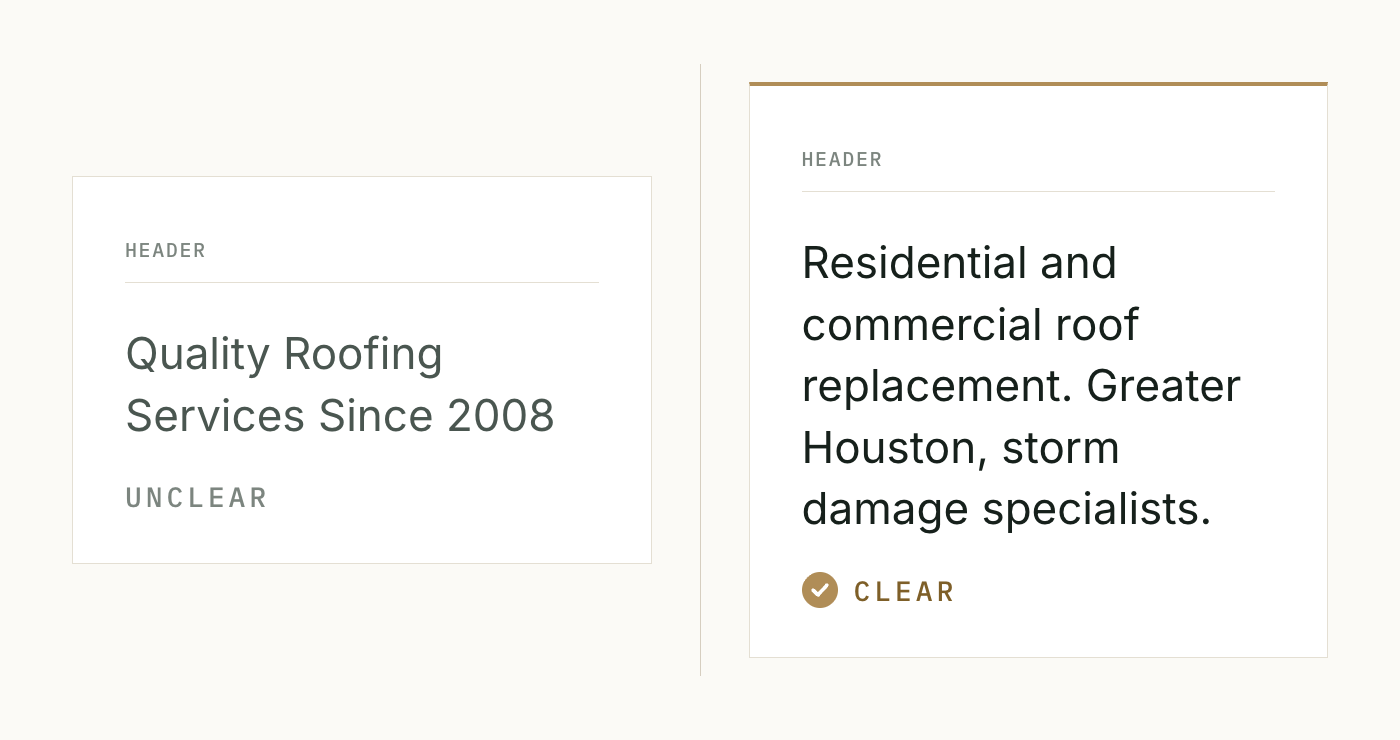
How to checkPull up your homepage and cover the company name. Read only the headline and subheadline. Can you tell, from those words alone, what trade the company is in, what area they serve, and what services they offer? If not, you have a positioning problem. Ask someone who has never seen your site to look at it for five seconds and then tell you what the company does and where. Their answer will tell you exactly what a stranger takes away from the first screen.
A positioning problem on the homepage is the most common reason a site gets traffic and no calls. It is also the one owners least expect, because the site looks complete. But looking complete and communicating clearly are different things.
Why don't visitors trust my website enough to call?
Suppose someone lands on your site, reads the headline, and understands you are a plumber in their city who handles the work they need. They still might not call. The reason is usually that nothing on the page gives them enough confidence to invite a stranger into their home.
This is the trust signal category. For service businesses, trust signals are specific: visible reviews from real customers, a clear description of what happens after someone contacts you, licensing and insurance information, and evidence the business is established. When none of these are visible without scrolling, a visitor who is comparing two or three options will often choose the competitor whose site makes the business feel more credible.
The most common failure here is not bad reviews. It is no reviews visible at all. An HVAC customer about to spend several thousand dollars on a system replacement wants to see that real people have trusted this company before picking up the phone. If the site shows no reviews, no certifications, and no process description, the customer keeps looking.
For plumbing and roofing, the trust gap often shows up around emergency service signals. A customer with a burst pipe wants to know someone will actually answer and come out quickly. If the site says nothing about response time or availability, some of those customers call the next contractor whose site does.
How to checkLook at your site as a first-time visitor who has never heard of the business. Is there any social proof visible without scrolling? A Google review count, a star rating, or a few customer quotes? Does the site say what happens after someone contacts you? Is there any mention of licensing, insurance, or years in operation? If the answer to most of those is no, the site is not doing the credibility work needed to move visitors from "this might be right" to "I am going to call."
Note on order: adding reviews to a site that has a positioning problem does not fix the calls problem. If a visitor cannot tell in the first five seconds that you serve their area and do the work they need, they will not stay to read the reviews. Positioning comes before trust, and trust comes before the conversion path.
Why am I getting traffic but still no calls?
If you have visitors, clear positioning, and visible trust signals, but calls are still not coming in, the problem is usually friction on the path from "I want to call" to "I am actually dialing." This is the most common version of the "website gets traffic but no calls" situation for owners who have already worked on the site.
Most owners underestimate how much friction costs. The path from landing on a page to completing a phone call involves several small decisions, and each unnecessary step loses some percentage of people who would have called if the process were simpler.
Common friction points: the phone number is not visible without scrolling. On mobile, the number is not a clickable tap-to-call link, so the visitor has to write it down and dial manually. The site uses a contact form as the primary option, and the visitor is not sure anyone will respond quickly. There are no business hours listed, so the visitor does not know if calling now will reach anyone.
Mobile matters more in this trade than most. A large share of local service searches happen on a phone, often when the problem is active. Someone with a clogged drain or a roof leak after a storm is not sitting at a desk. They are standing in their kitchen, holding a phone, looking for a number to call right now. If your number is buried at the bottom of the page and is not a tap-to-call link, that person calls the next contractor whose number is at the top of the screen.
On page load time: Google research found that as load time goes from one second to three seconds, the probability of a visitor leaving immediately rises 32%. From one to five seconds, that figure rises to 90% (Think with Google, 2017). A service business website not working because it loads slowly on a mobile connection is losing callers before they ever see the phone number. A slow site is a hidden friction point that looks like a conversion problem but is actually a technical one.
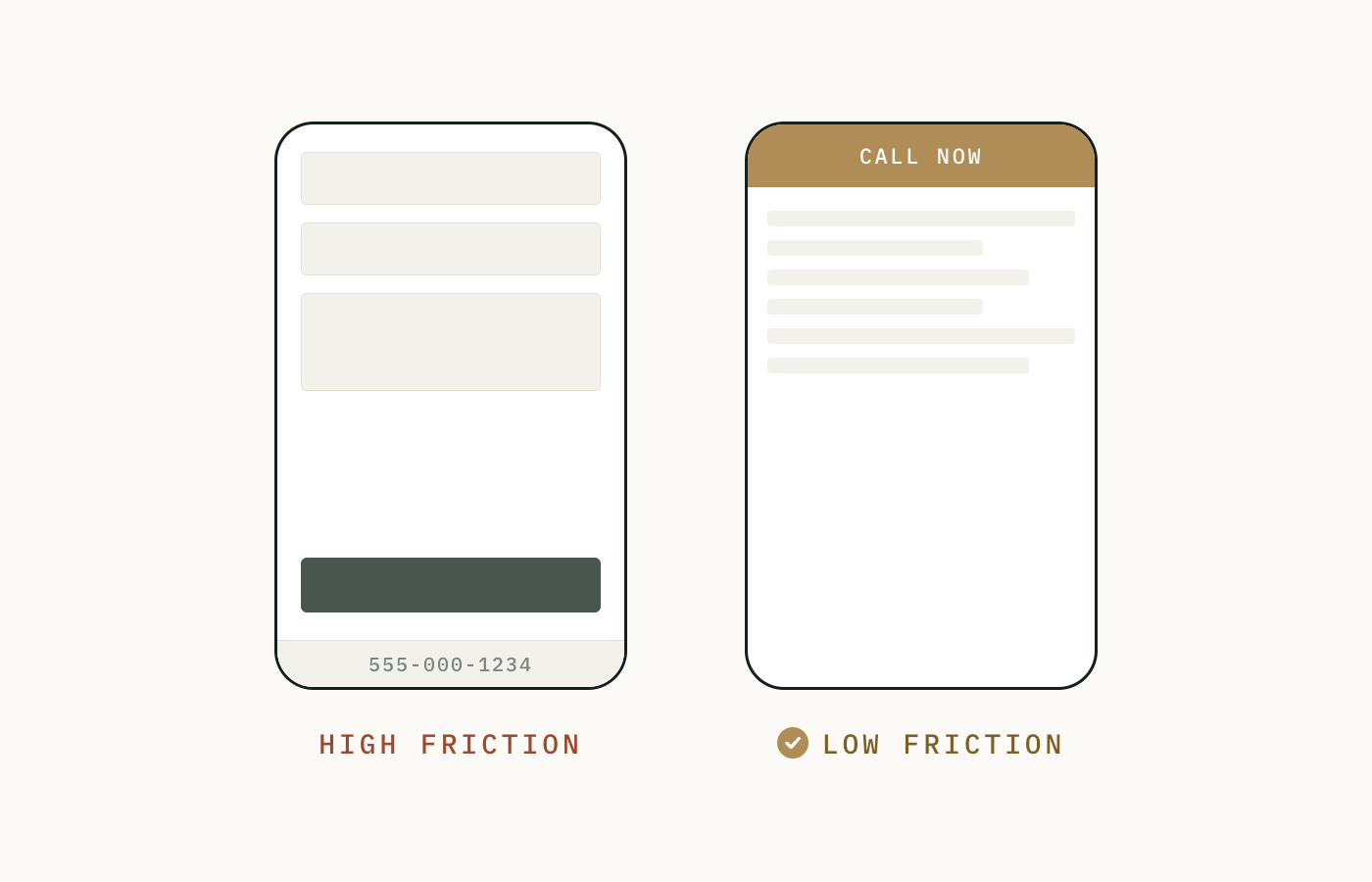
How to checkPull up your site on your phone. Do not scroll. Is the phone number visible? Is it a link you can tap to call immediately? If not, that is your first friction point. Now count the steps from the moment you land to the moment you are placing a call. Every step beyond "see number, tap to call" is a potential exit point. If the fastest path to calling requires more than two or three steps, you are losing callers at the last stage of the process.
The conversion path issues described here are covered in full in the article on why a website gets visitors but no phone calls. If you have already confirmed you have traffic and the problem is callers not converting, that article gives the complete treatment.
Is my website the problem or is it something else?
Sometimes the site is not the only issue. A website not converting to phone calls can also reflect problems that live outside the page: a Google Business Profile that is incomplete or unverified, a service area mismatch between what the site says and what the Google listing shows, or a business category on Google that does not match what customers actually search for.
That said, in most cases where a service business describes "no calls from website," the cause is one of the four categories above. The site either is not visible, is not clear, is not trusted, or is not easy to call from. Off-site factors compound a site problem rather than replace it. Fix the site first, then audit the external presence.
For electricians and HVAC companies in particular, one additional factor worth checking: if the business serves a wide geographic area but the Google Business Profile lists only a single city, the profile may be limiting visibility in surrounding areas even when the site ranks. This is a demand problem, but it starts outside the website itself.
Why most owners blame the wrong category
The reason this four-category framework matters is that owners almost always assume the wrong category first. Traffic is the most visible metric, so when calls are down, the instinct is to assume the site needs more traffic. That is true only for the first category. For the other three, adding traffic makes almost no difference because the site is losing the visitors it already has.
Design is the second most common assumption. "The site looks outdated, so we need a new one." A new design can help, but only if the redesign also addresses the actual positioning, trust, or friction problem. A redesign that produces a cleaner homepage with the same vague headline and a buried phone number generates the same call volume as before.
The four categories exist so you know which problem you are actually fixing before you spend money. Knowing that the problem is a friction issue on mobile changes what you spend money on. Knowing the problem is a positioning issue changes what you change on the homepage. The fix follows the diagnosis, and the diagnosis has to come first.
Frequently asked questions
Why is my service business website not getting calls despite high Google ranking?
Traffic and conversion are two separate problems. A site can rank well for certain searches and still generate almost no calls if visitors cannot quickly understand who you serve or if the path to calling has too much friction. Ranking gets you in front of people. The site's positioning, trust signals, and conversion path determine whether any of those people pick up the phone. A high rank with a vague homepage headline or a buried phone number will still produce very few calls.
Why does my website look fine but not generate calls?
Looking good and converting visitors into callers are different jobs. A site can be visually polished and still fail to clearly name who you serve, what area you cover, or what happens when someone contacts you. Most visitors decide in a few seconds whether to stay or leave. If the clearest thing on the page is a tagline that does not name the service or the location, many of those visitors leave without calling, regardless of how the site looks.
Is my phone number visible enough on my website?
For most service business websites, no. The phone number tends to sit in the footer or at the end of a contact page. On mobile, it is often not a tap-to-call link, which means a visitor has to write down the number and dial manually. The number needs to be visible in the first screen of content on any device, without scrolling, and on mobile it needs to function as a tap-to-call link. Hiding or burying the phone number is one of the most common reasons a website is not converting to phone calls.
Why am I getting traffic but no leads from my website?
If visits are coming in but no one is contacting you, the problem is almost always positioning, trust, or conversion path friction. The site is visible enough to bring in visitors but is not doing the work needed to convert them. Positioning means the page clearly states what you do and where. Trust means the page shows reviews, licensing, and process. Friction means the phone number is easy to find and easy to call. If any of those three are missing, traffic will not produce calls. For a full treatment of the traffic-without-calls situation, see the article on why a website gets visitors but no phone calls.
What is the number one reason a website isn't getting calls?
Based on site reviews across trades, the most common single cause is a missing or buried phone number combined with unclear positioning in the headline. A visitor who cannot tell in the first five seconds that this business serves their area and does the work they need will not scroll to find the contact page. The number and the service clarity both need to be above the fold. When those two things are missing together, the site gets visits and produces no calls, regardless of how much traffic arrives.
Why isn't my website generating leads when I paid so much for it?
The cost of building a website has no relationship to whether it converts visitors into callers. A website can be expensive to build and still have a vague headline, no visible reviews, and a phone number buried in the footer. Conversion design is a different discipline than visual design. Most web development projects prioritize how the site looks over whether it clearly positions the business, earns trust, and makes it easy to call. The price paid for the build does not guarantee any of those things were done.
How do I know if my website is the reason I'm not getting calls?
Run two tests. First: pull up the site on your phone, without scrolling, and check whether the phone number is visible and tap-to-call. Second: cover the company name on your homepage and read the headline out loud. If someone hearing that headline could not tell what trade you are in, what city you serve, and what your main service is, the site has a positioning problem. If both tests pass and calls are still not coming in, look for visible reviews, licensing information, and a clear statement of what happens after someone contacts you. If any of those are missing, that is the likely cause.
Why isn't my phone number clickable on mobile?
Most DIY website builders and many web developers use static text for phone numbers, which looks like a number but does not dial when tapped. To function as a tap-to-call link on mobile, the number needs to be wrapped in a link using the tel: format. When that is missing, mobile visitors have to manually copy or type the number to call, and a meaningful portion of them do not. This is a technical oversight, not a design choice, and it is fixable without rebuilding the site.
Not sure which of these four categories your site falls into? We run a structured free review and tell you exactly which category is the active problem, what it is costing you, and where to start. No pitch, no upsell. A diagnostic read and a straight answer.
Request a Free Site Review →