A service business website needs seven things to consistently turn visitors into callers: a headline that names who you serve and where, a visible phone number that works on mobile, reviews with real names and locations, a clear list of what you actually do, one specific reason to call you instead of the next result, a friction-free path to contact, and a page that loads fast. When all seven are present, the site does its job. When one is missing, the calls stop and you rarely know which element failed.
What makes a good service company homepage?
Most service business websites look like websites. They have a logo, a list of services, and a phone number somewhere. But looking like a website and working as a website are two different things. A site that works is one where a plumber in Frisco, a roofer in Tampa, or an HVAC shop in Phoenix can say: "We get consistent calls from this site." A site that does not work is one where the traffic report shows visitors but the phone is quiet.
The seven elements below are what separate one from the other. For each one, the contrast is the teaching: what the element does when it is there, and what it costs you when it is not.
Each element belongs to one of four underlying categories: whether the right people find you (demand), whether the site clearly says who you serve and what you do (positioning), whether visitors trust you enough to call (offer and trust), and whether calling is easy (conversion path).
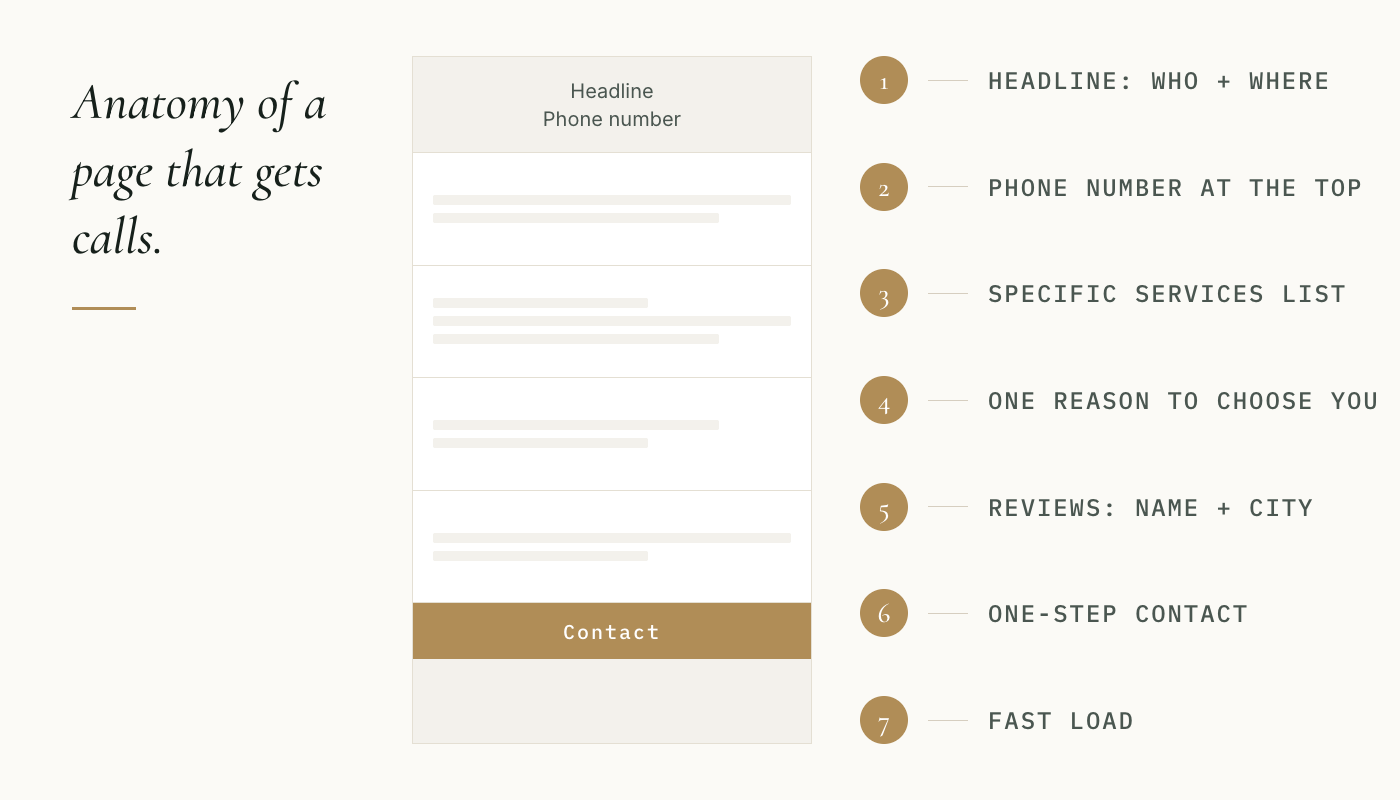
What are the seven things a service business website needs to get more calls?
A headline that names who you serve and where
What it does when it is there. A visitor landing on a plumbing site in Aurora, Colorado sees "Emergency Plumber in Aurora, CO. We answer the phone 24/7." They know in two seconds they are in the right place. They keep reading.
What it costs when it is missing. The headline says "Your Trusted Plumbing Experts" or "Quality Service You Can Count On." The visitor cannot tell what city you serve, whether you do emergency calls, or whether you do residential or commercial. They go back to Google and click the next result. The site had two seconds to hold them and used both on a line that told them nothing.
Category this belongs to: positioning.
A phone number that is impossible to miss on a mobile screen
What it does when it is there. A homeowner in your service area finds your roofing site from their phone. The number is at the top of the screen, large, and tappable. One tap and they are calling. The whole sequence from "found the site" to "on the phone" takes thirty seconds.
What it costs when it is missing. The number is in the footer. On a desktop it is fine. On a mobile screen it requires scrolling past every section of the page, or finding a "Contact" page, or hunting through a form. Most people do not do that. They close the tab and call the roofer whose number was at the top.
According to Google (2018), 76% of people who search on their smartphones for something nearby visit a business within a day. That action chain starts and ends on mobile. A phone number buried in a footer breaks the chain before it begins.
Category this belongs to: conversion path.
Reviews with real names, real locations, and a recent date
What it does when it is there. A visitor sees: "John M., Katy TX, March 2026: They fixed a burst pipe at 11 PM and were at my door in 45 minutes." That is a specific person, a real city, a recent job, and a concrete outcome. The visitor can picture it happening to them.
According to the BrightLocal Local Consumer Review Survey (2026), 85% of people are more likely to use a business after reading positive reviews. And 54% of consumers visit a business's website specifically after reading positive reviews. Those visitors are already primed. If reviews are absent or vague when they arrive, the site undoes the goodwill the reviews created.
What it costs when it is missing. The site has no reviews, or it has "Great service! Highly recommend!" with no name and no location. A review without a name and city is indistinguishable from one you wrote yourself. Visitors know this. They discount it or ignore it, and they wonder why you are hiding real customers.
Category this belongs to: offer and trust.
A specific list of what you actually do (not just a category name)
What it does when it is there. A visitor coming from a Google search for "water heater replacement near me" lands on a plumbing site and sees a services list that includes "Water Heater Installation and Replacement." They know immediately they called this one right. They keep reading.
What it costs when it is missing. The site says "We handle all your plumbing needs" or lists three broad categories with nothing specific under them. The visitor is not sure you do water heaters. They are not going to call to ask. They go back and find a site that makes it obvious.
Category this belongs to: positioning.
One specific reason to call you instead of the next result
What it does when it is there. Your roofing site says "We come out the same day and give you a written estimate before we touch anything. No obligation." That is a specific promise. It answers the question every visitor is silently asking: "Why this company and not one of the others?" A visitor who was already leaning toward calling now has a reason to stop comparing.
What it costs when it is missing. The site says "We are locally owned and operated" or "We have been serving the area for over 20 years." Those are claims. They are not reasons. Every other roofer on the page says something similar. The visitor has no way to sort between you and the next result, so they open three more tabs and call whoever answers first.
Category this belongs to: positioning.
A contact path with one step, not three
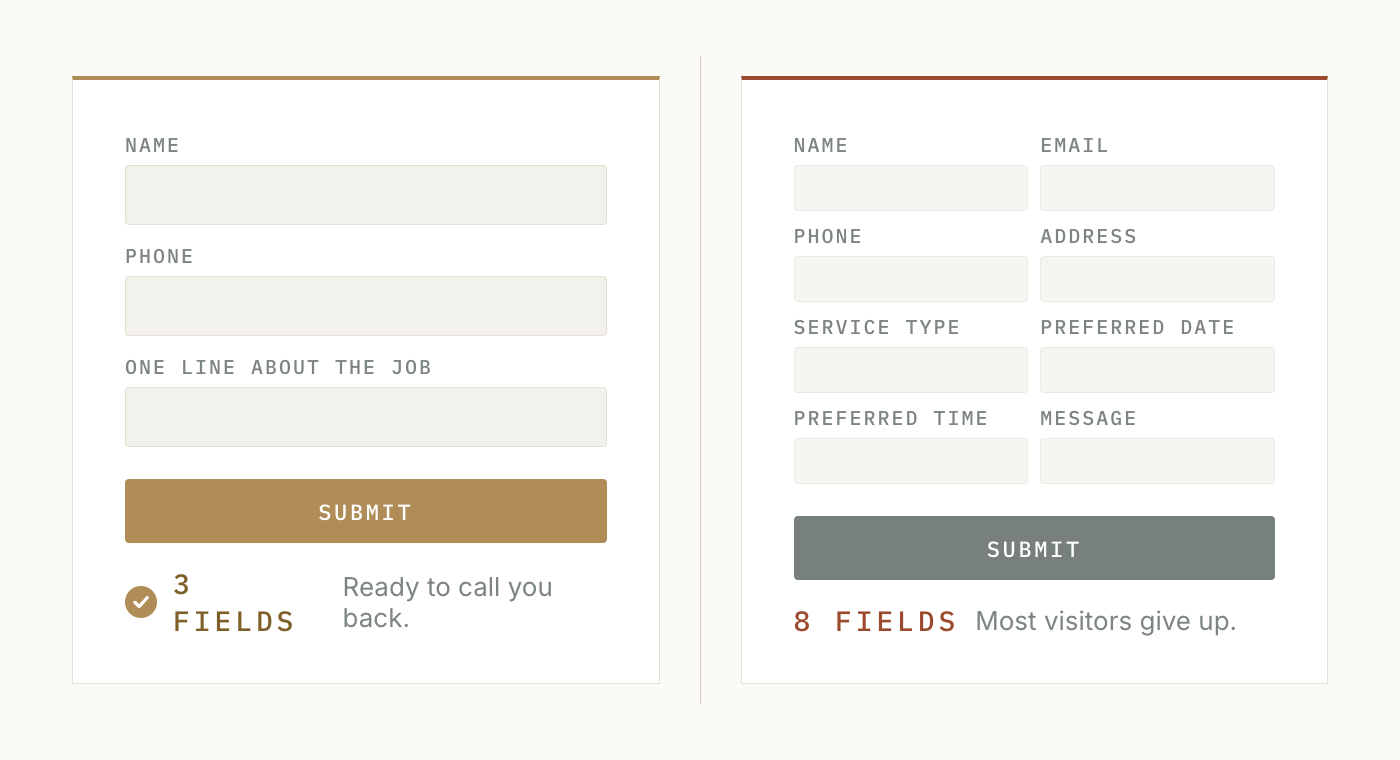
What it does when it is there. The call button is visible without scrolling. The phone number is clickable on mobile. If there is a form, it asks for name, phone, and one line about the job. That is it. A visitor who decides to reach out can do it in under a minute.
What it costs when it is missing. The contact page has a form asking for name, email, phone, address, service type, preferred date, preferred time, and a message box. This form exists because someone thought it would help with scheduling. What it actually does is filter out every visitor who is in any hurry.
Plumbing and roofing calls are often urgent. A visitor with a leak or a missing-shingles situation is not filling out eight fields. They are calling the roofer or plumber with one tap.
There is also a less visible failure: even a simple form is worthless if it is broken or goes unanswered. According to Leadferno's 2023 research on contact form lead management, 4.8% of submitted contact forms were in some way broken, and 42.6% of submitted leads received no response at all. A contact path that does not deliver leads is the same as no contact path.
Category this belongs to: conversion path.
A page that loads in under three seconds
What it does when it is there. The visitor arrives and the site appears quickly. They see the headline, the phone number, and the reviews before impatience sets in. The site gave them a reason to stay before they had a reason to leave.
What it costs when it is missing. According to Think with Google (2017), as page load time goes from one second to three seconds, the probability of a bounce increases 32%. From one second to five seconds, that figure rises to 90%. Most visitors leave before seeing a single element on a slow site. They do not know it is slow. They just know nothing is happening and they go back. This is the element most owners never think about because the problem is invisible. You cannot see a visitor leave. You only see that the calls did not come.
To check your own site: type your web address into Google PageSpeed Insights (a free Google tool at pagespeed.web.dev). It will tell you the load time on a mobile connection and flag what is slowing it down. A score above 90 out of 100 is a passing grade.
Category this belongs to: demand and conversion path combined. A slow site hurts both whether you show up in search results and whether visitors who do arrive stay long enough to act.
How many of these does a service business website actually need?
All seven. That is not an arbitrary number. Each one handles a different reason a visitor might leave without calling. A site with a fast load time and a clear headline but no reviews loses visitors who needed credibility before calling. A site with excellent reviews and a specific headline but a hard-to-find phone number loses visitors who were ready to call but gave up trying.
A site that gets consistent calls has covered all seven because each one is a different exit door. Closing six of seven still means one door is open. Knowing which door matters more than knowing the checklist itself, which is why the section below matters.
What does this checklist not cover?
Going through this list and finding that your site is missing two or three of these elements tells you what is wrong. It does not tell you how to fix it, because the fix depends on how your site is built, what your hosting setup is, and in some cases what service area you are actually targeting.
The article Why Is My Service Business Website Not Getting Calls? walks through the four diagnostic categories in detail and helps you identify which one is doing the most damage on your specific site.
A free site review looks at your site against these categories specifically and tells you which one is costing you the most calls and what to look at first. That is the starting point before any rebuild work.
Frequently asked questions
What should a plumber's website have to get more calls?
A plumber's website needs a headline that names the city you serve and the type of work you do (emergency plumbing, drain cleaning, water heater replacement, and so on), a phone number visible at the top of every page without scrolling, at least a handful of reviews that include names and locations, and a contact path that works in one tap on a mobile screen. Those four are the highest-impact elements for a plumbing site. The other three in the checklist above (specific services list, a reason to choose you, and fast load time) close the remaining gaps.
Why does my service business website have visitors but no one calls?
Traffic without calls means your site is doing some jobs but failing at at least one of the seven elements above. The most common pattern is one of two things: the site does not make it immediately clear what you do and where you do it (a positioning problem), or the path from "interested visitor" to "person on the phone" has too much friction. The fastest way to diagnose which is the culprit is to go through the seven-element checklist above and note which ones your site is actually missing, not just sort of covering.
What should be on a plumbing company website?
The same seven elements apply to a plumbing company website as to any service business site, but the priority order shifts slightly. Plumbing calls are often urgent, so the phone number placement and load speed matter more than for lower-urgency trades. Get those two right first. Then a specific services list (so a visitor searching "water heater replacement" knows immediately you do that job), real customer reviews with names and cities, and a headline that names your coverage area. The contact form, if you use one, should have three fields at most.
Does my plumber website need to rank on Google to get calls?
Ranking on Google is one path to calls, but it is the demand piece of a larger picture. A site that ranks on page one but has no readable headline, no visible phone number, and no reviews will still get very few calls, because ranking gets visitors to the site and the site itself has to turn them into callers. The seven elements in this article are what happen after the visitor arrives. If you are ranking and not getting calls, the problem is almost certainly in one of these seven, not in your ranking.
How long does it take to fix a service business website that is not getting calls?
That depends entirely on which element is missing and how your site was built. Adding a click-to-call button to a mobile header can take an afternoon. Rewriting a headline takes an hour. Fixing a site that is slow to load can take a day or a week depending on the cause. Fixing positioning that is wrong at a deeper level takes longer because it requires understanding what makes you different from the other results on the page. The checklist tells you what to look at. A site review tells you where to start.
Is there a free way to check if my website has these problems?
Yes. The Google PageSpeed Insights tool (free, at pagespeed.web.dev) checks load time and gives your site a score out of 100. For the other six elements, you can go through the checklist above yourself: pull up your own site on your phone as if you were a new visitor, and check whether each element is present. If you would rather have a structured outside look, a free site review goes through your site against all four diagnostic categories and tells you what is costing you calls.
What should be on a roofing company website or HVAC website?
The same core checklist applies. For a roofing company website, the most common missing element is a reason to call you specifically. Roofing is a comparison category: visitors open multiple tabs and call several companies before booking. A written estimate guarantee or a same-day inspection offer gives them a reason to stop comparing and call you first. For an HVAC company website, the most common problem is a vague services list. Visitors searching for "AC repair" or "furnace tune-up" need to see those exact words to feel confident they landed on the right site.
If you want a structured read on which of these seven elements your site is missing, we do that as a free review. We look at the site against each category, name which one is the active problem, and tell you what to look at first. No pitch, no upsell. A diagnostic read and a straight answer.
Request a Free Site Review →